Built for day-to-day ITSM operations
If Zendesk is your internal service desk, the hardest part isn’t finding the data. It’s spotting when the queue is drifting off course before it turns into a backlog problem.
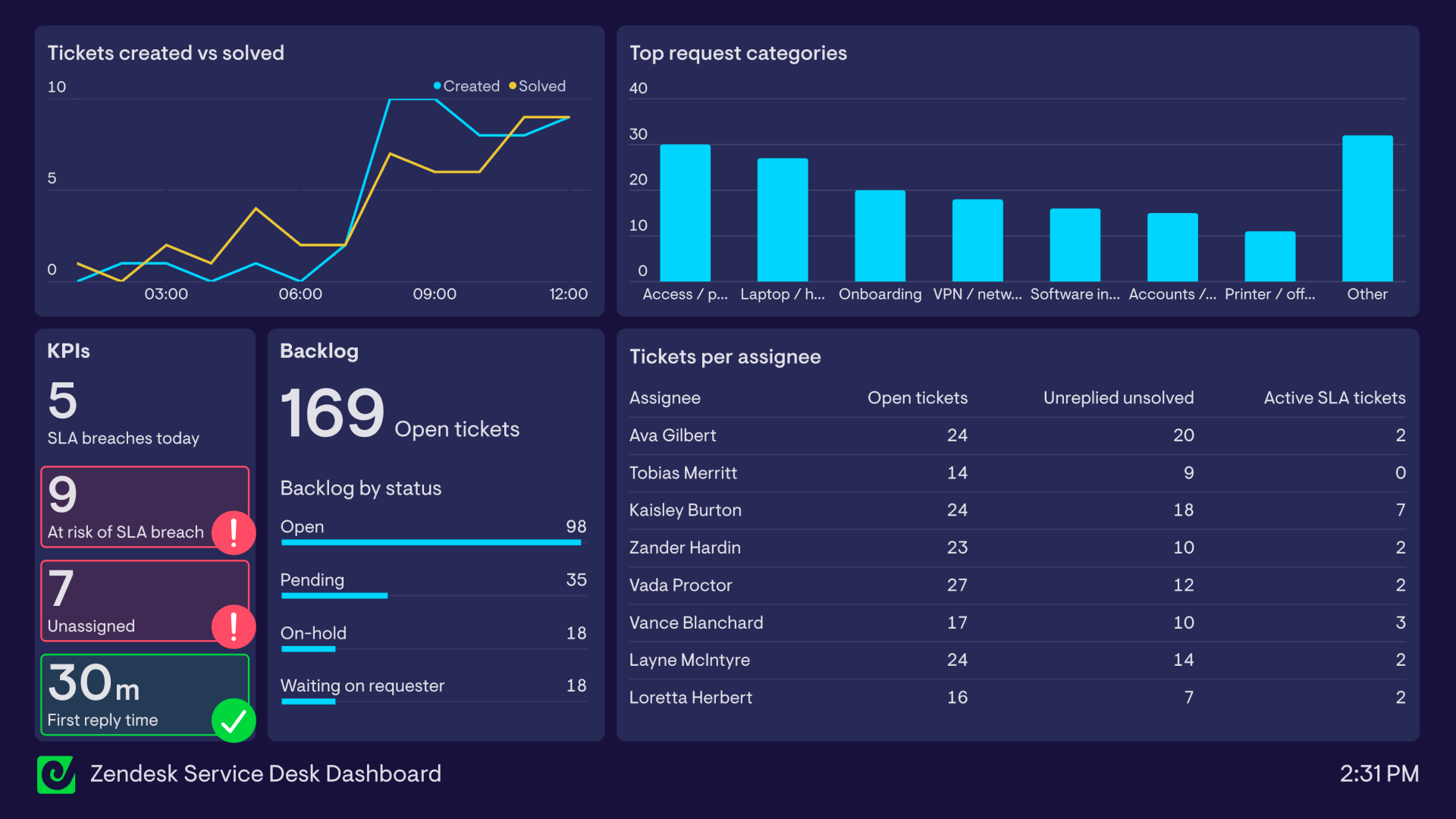
This dashboard is built for monitoring day-to-day operations: ticket flow, backlog status, and the work that needs attention right now - all designed to sit on a screen.
What this dashboard is for
- Keep the queue healthy during the day (not just in weekly reporting)
- Catch SLA risk early, before breaches stack up
- Make workload visible (and uneven workload obvious)
- See what employees are actually asking for, so you can fix repeat demand upstream
Zendesk service desk dashboard
What’s on the dashboard
Tickets created vs solved (line chart)
What it shows: created and solved tickets over the last few hours.
Why it matters: if created is outpacing solved, you’re accumulating debt. If solved is higher, you’re recovering.Top request categories (bar chart)
What it shows: current demand mix by category (access, hardware, onboarding, VPN/network, software installs, accounts/SSO, printer/office, other).
Why it matters: gives quick context for why the queue looks the way it does - and highlights where self-serve or automation could remove volume.KPIs
SLA breaches today: what’s already gone wrong today.
At risk of SLA breach: the early warning you can act on.
Unassigned tickets: hidden work; usually the fastest fix.
First reply time: the speed metric employees actually feel.Backlog
Open tickets: the baseline queue size.
Backlog by status: Open, Pending, On-hold, Waiting on requester.
Why it matters: status mix explains whether you’re blocked (waiting), actively working (open), or stuck in limbo (on-hold).Tickets per assignee (table)
Columns: Open tickets, Unreplied unsolved, Active SLA tickets.
Why it matters: this is the “capacity + risk” view in one place. Open tickets shows load, unreplied unsolved shows where first response is slipping, and active SLA tickets surfaces who has time-sensitive work.How teams typically use it
In practice, this is the dashboard you glance at during the day:
- Morning kick-off (“are we already behind?”)
- Midday drift check (“is the backlog creeping?”)
- End-of-day handover (“what can’t wait?”)
FAQ
What should a Zendesk IT service desk dashboard include?
Ticket flow (created vs solved), backlog size and status mix, SLA risk, first reply time, and workload by assignee.Is this different from a customer support Zendesk dashboard?
Yes — internal service desks tend to care more about backlog health, assignment, and operational drift than customer-facing metrics like CSAT.Focus area
Queue health, SLA risk, and workload visibility for internal IT service desks.
Who looks at it?
IT service desk managers, team leads, and on-call agents.
How often?
Throughout the day for live monitoring and handovers.
- Zendesk Support