Recruitment dashboard examples
A recruitment dashboard tracks the full hiring funnel — from employer brand interest and applications to candidates moving through each stage. It keeps recruiters and hiring managers aligned on where the pipeline stands and where there's pressure to move faster.
Recruitment dashboard
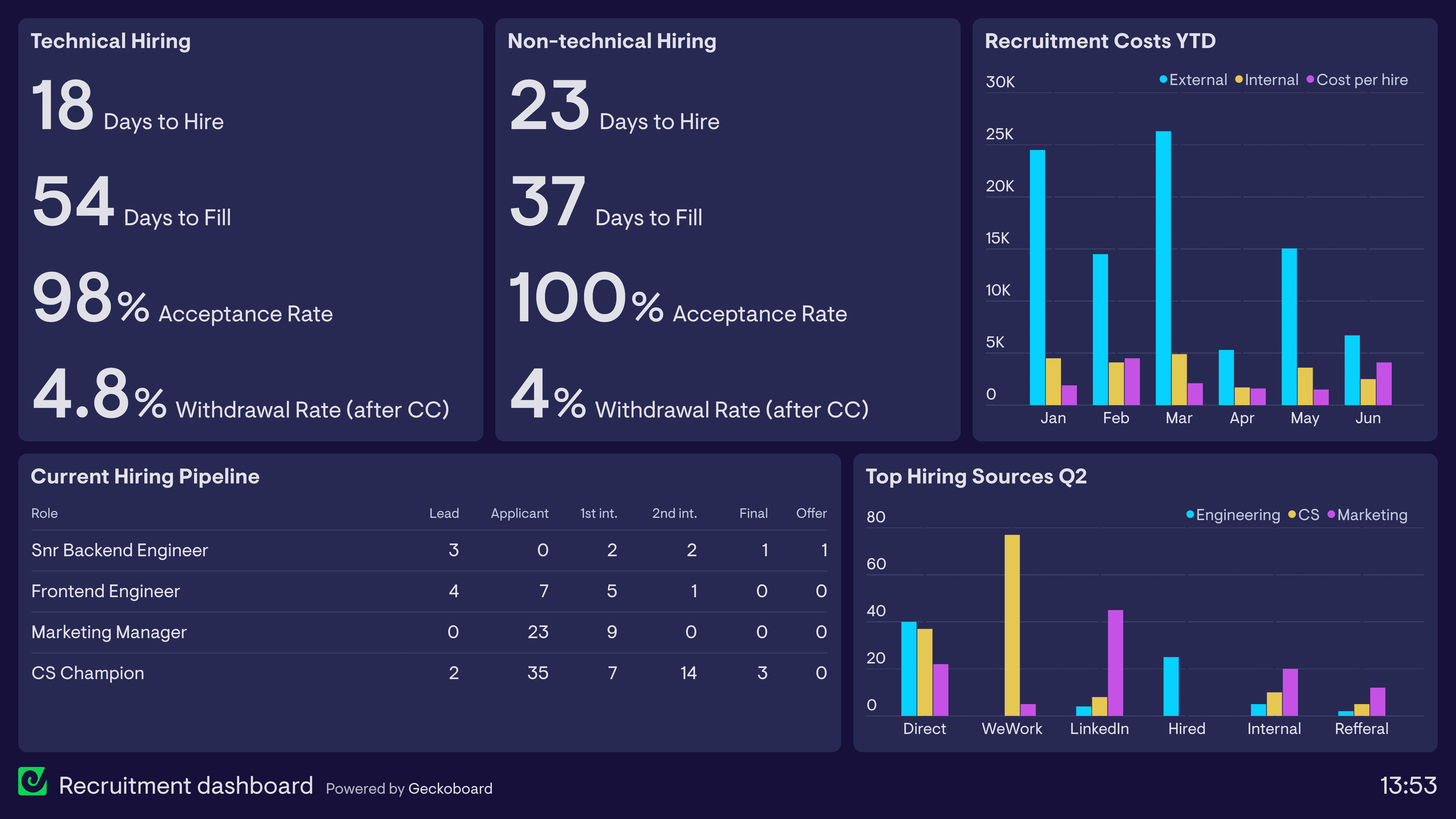
This dashboard is designed to give everyone in the company, particularly hiring managers, a clear understanding of the recruitment process, without needing to constantly request information from HR or the recruitment team.
By tracking Average Days to Hire, which measures the average number of days it takes a single candidate to move through the entire process, hiring managers can set transparent expectations to potential candidates. Similarly, tracking Average Days to Fill, which measures the average number of days it takes the company to begin recruiting and fill a role, the HR team can propose realistic timeframes to management, so they can better plan resource allocation, and begin recruiting at the right time.
The dashboard also helps to set expectations on the cost of recruitment, as well as the most productive places to focus hiring efforts. Finally, the dashboard provides a live update on the number of candidates who have applied and progress to each stage of the hiring process. This is a helpful way to keep everyone up to date with how open positions are progressing, without requiring colleagues to request this information manually.
Recruitment KPIs dashboard
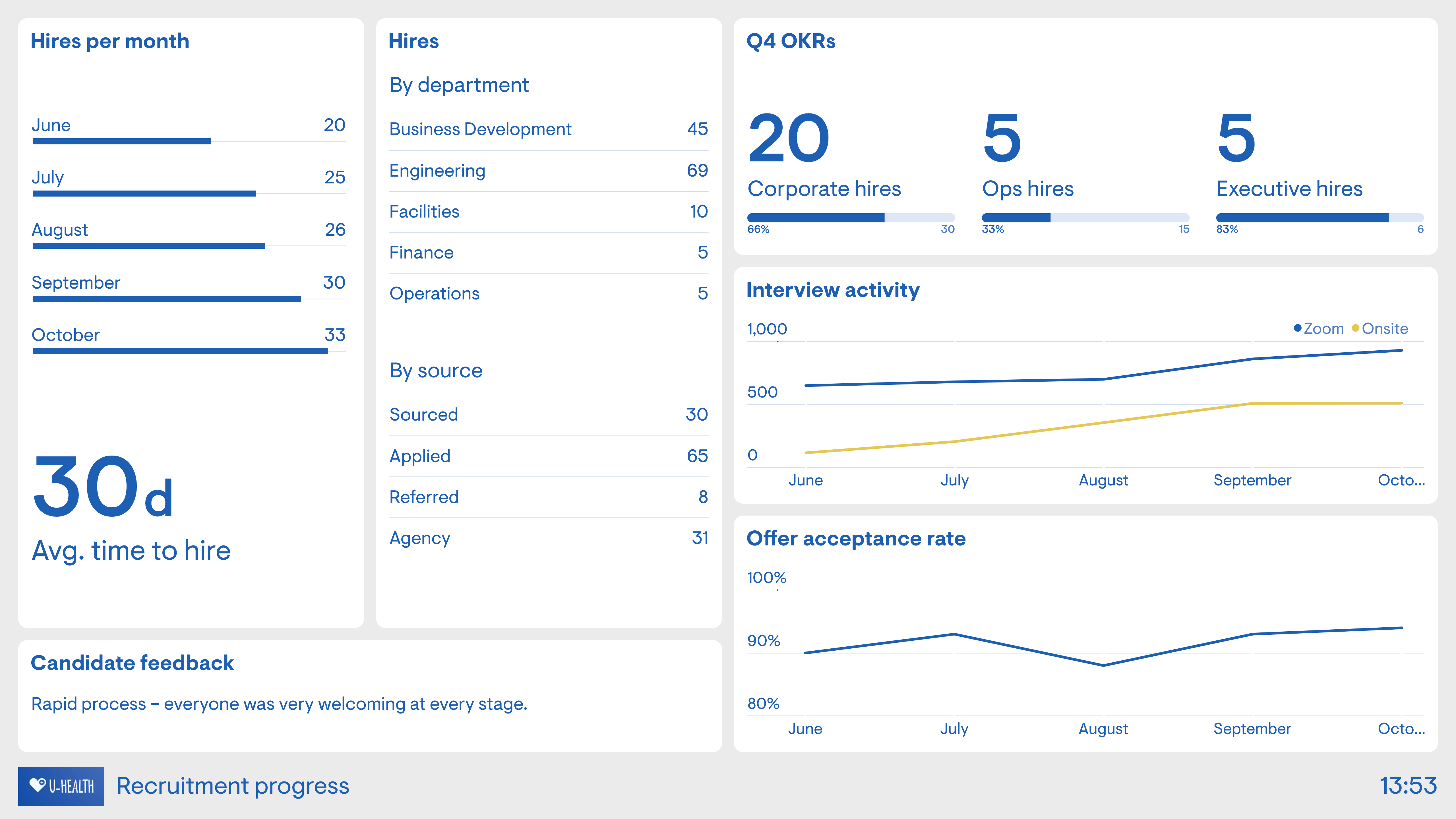
This dashboard gives a similar overview of the recruitment process, but is more goal-oriented, particularly with regard to the internal recruitment team's OKRs (Objectives and Key Results). As a growing business, it’s important for this People Team to keep up the hiring momentum, in line with company growth. This dashboard enables the Head of People to see if the team is on track. It also provides a source of motivation for the team as they work towards filling the new roles.
The dashboard has some features which helps the team to understand the hiring process in more detail. For example, as the company begins to shift away from fully remote working, we can see the number of onsite interviews increasing, proportional to interviews conducted virtually on Zoom. Qualitative candidate feedback is also an important sense check on how candidates are responding to the process.
Careers page analytics dashboard
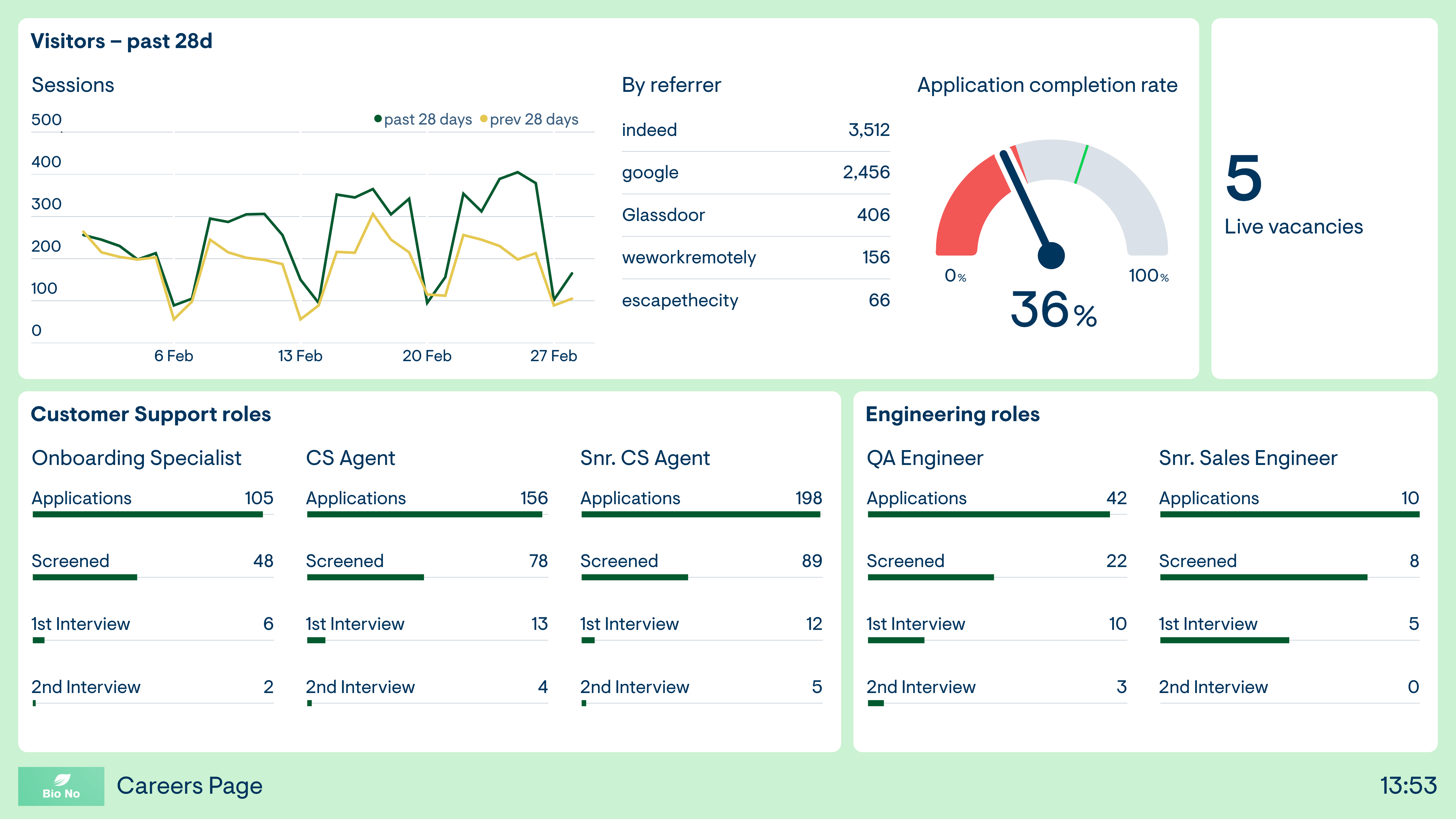
This dashboard is built around the digital experience for potential new candidates. It tracks the number of sessions to the careers page (an important indicator of the health of the company’s ‘employer branding’) as well as the top sources driving that traffic.
A gauge icon indicates the completion rate of the application form. Here, we can see that a negative status indicator has triggered, meaning that the application completion rate has fallen below the HR manager’s acceptable level. This could indicate a User Experience issue with the form, or that the users they are attracting are less engaged than before.
Furthermore, the dashboard is tracking the number of applicants who have progressed through each stage for the five open vacancies. This serves as a helpful source of information for anyone who is interested in how a particular open position is progressing.
Browse other popular examples
A recruitment dashboard gives HR and talent acquisition teams a view of pipeline health, time-to-hire, and sourcing performance across open roles. It helps recruiters and hiring managers track where candidates are in the process — and identify bottlenecks before they delay hiring.
Geckoboard is a live dashboard tool that connects to spreadsheets, ATS platforms, and web analytics to give recruiting teams a real-time view of hiring pipeline and employer brand performance. It replaces manually assembled reports with a dashboard that updates as the underlying data changes.
Key metrics include open roles, applications received, interviews scheduled, offers made, acceptance rate, time-to-hire, and sourcing channel breakdown. Teams tracking their careers page also monitor web traffic alongside application volume.
Building a custom recruitment dashboard is straightforward with Geckoboard's dashboard builder. Connect Google Sheets, Google Analytics, and SQL databases and custom data sources to pull ATS data and careers page metrics, then pick your metrics and build the view you need. Share with your team as a TV dashboard, shared link, or scheduled snapshot. Start a free trial or learn more about how Geckoboard works.
Use it to see which roles are falling behind and where the pipeline is stalling before it becomes a headcount problem. It also helps bring your ATS, job boards, and website together into one view of the entire hiring funnel.