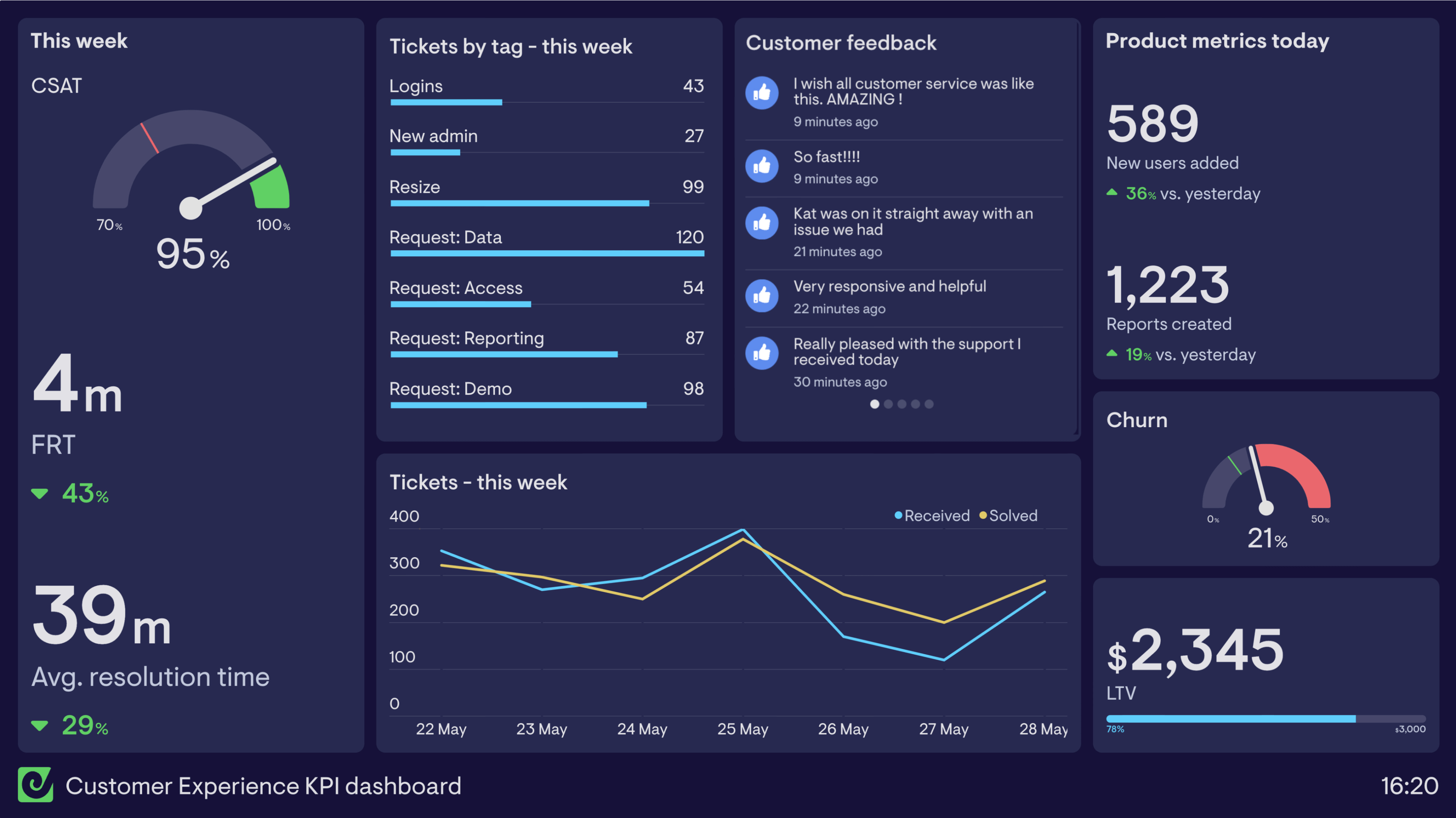
Real-world dashboards used by support teams to track call center performance, customer service KPIs, CSAT, SLAs, and agent performance.
A call center dashboard (or contact center dashboard) visualizes live metrics such as number of calls, wait time, and customer satisfaction. This enables call center teams to create a better customer experience by quickly reacting to changing situations. In physical call centers, these dashboards are usually displayed on TVs where everyone can see them, but they are equally useful for remote and hybrid teams.

This dashboard is primarily focused on live data, showing how the team is performing on that day. On the left, the team’s Customer Satisfaction score (CSAT) is visualized alongside daily scores for the previous seven days, with a target of 95% highlighted in green. This positive feedback loop helps focus performance and improve motivation.
The dashboard also shows call volume, Average Wait Time, and Abandonment Rate — helping the team see if they’re keeping up with customer demand. A metric tracking the percentage of successful call resolutions is balanced by a leaderboard for the most resolutions by agent. On the right, calls waiting right now and live agent status alert the team when they’re experiencing high volume so they can react quickly.

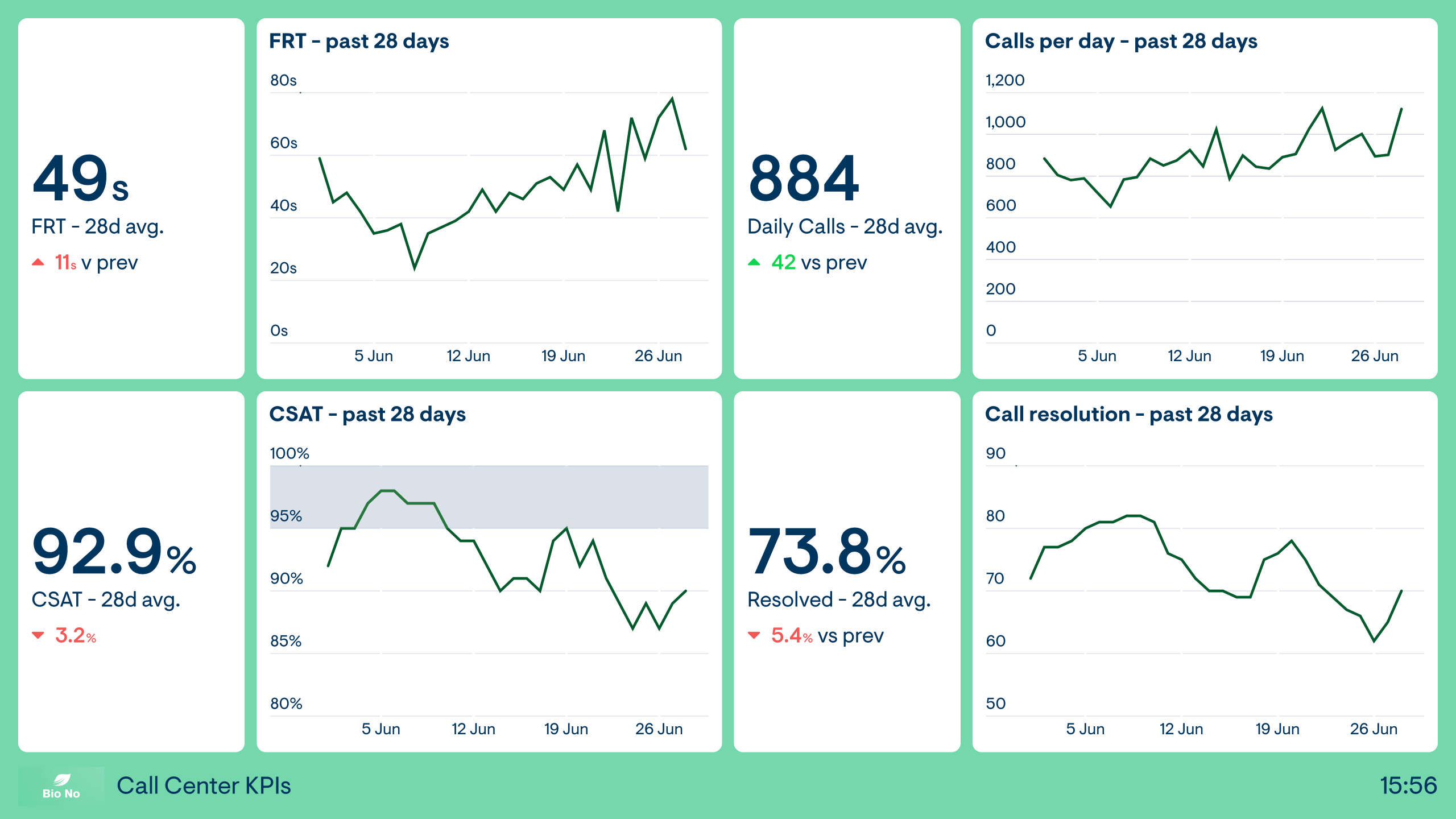
This dashboard is less focused on performance that day and more on overall KPI trends for the month. This broader perspective allows teams and team leaders to put their key metrics in context and improve performance in the long term. It visualizes four KPIs: First Response Time (FRT), Customer Satisfaction (CSAT) from a short post-call survey, Calls per Day, and Call Resolution — the percentage of calls successfully resolved.
Build dashboards like these with Geckoboard
Try freeA customer service dashboard visualizes a support team’s performance in real-time so they can better react to important changes and achieve their goals. These dashboards are used by CS teams at a wide variety of businesses, working across multiple support channels including call support, live chat, email, and self-service.

This dashboard is based on one used by a SaaS business to track their Customer Service KPIs. It shows live tickets (open and unassigned), plus a line chart comparing tickets raised and closed each hour. It visualizes CSAT, First Response Time (FRT), SLA compliance, and IQS (an internal quality assurance score). Live data includes recent CSAT scores with comments, agent status, and a top ticket solvers leaderboard highlighting the team’s top performers.

This dashboard splits KPIs by support channel — sometimes called omnichannel support — so the team can understand how each channel is performing and prioritize accordingly. Across Live Chat, Call, and Email, the dashboard tracks First Response Time (FRT), Net Promoter Score (NPS), and new and closed tickets for the day. Self-service KPIs are tracked separately, showing NPS alongside the number of help center visitors this month.
Build dashboards like these with Geckoboard
Try freeIsara AI dashboards visualize AI-driven insights extracted from customer conversations across platforms like Intercom, HubSpot, and Zendesk. By analyzing tone, sentiment, and language patterns, Isara predicts customer satisfaction and highlights early signs of friction or churn — helping support leaders understand how customers feel in real time, without relying solely on surveys.

This dashboard provides a live view of predicted CSAT and customer sentiment across all support conversations. It highlights the percentage of warm and hot interactions alongside average upsell opportunities, helping support managers react quickly to shifts in customer mood and uncover opportunities to strengthen relationships.

This dashboard shows how customer satisfaction, frustration, and agent helpfulness evolve across weeks. It visualizes predicted CSAT trends, customer temperature mix, and team performance indicators — helping leaders understand what drives satisfaction changes and where to focus improvement efforts.
Build dashboards like these with Geckoboard
Try freeStylo Scores dashboards bring customer sentiment and urgency into the same real-time view as your Zendesk queue metrics. Instead of waiting for CSAT to land, you can see which conversations are trending frustrated, which are time-sensitive, and where your team might need support — while tickets are still open. Stylo writes its scores back to Zendesk as custom ticket fields, making them easy to surface in Geckoboard.

This dashboard is designed for support leads and team managers who want an early warning system for customer risk. It combines frustration by channel, a live new ticket list with Stylo urgency and frustration scores, peak delight and frustration metrics, predicted CSAT, an open ticket impact summary, and recent customer feedback. The Stylo scores are most useful as directional signals — use them to prioritize and investigate, then pair with what you already trust like SLA, backlog, and first response time.
Build a dashboard like this with Geckoboard
Try freeA CSAT dashboard breaks down one of the most important customer support KPIs, Customer Satisfaction (CSAT), helping teams better understand how and why it’s changing. CSAT dashboards are particularly useful for teams who have set long-term goals related to satisfaction — keeping the team focused on their progress.

This dashboard pulls CSAT data from a customer service platform like Zendesk, where it’s collected via a short survey after each interaction. It presents CSAT in three ways: aggregated performance for the month compared to the previous month (with a red status indicator triggered here because CSAT is below the acceptable level), individual CSAT scores for each CS agent to create personal accountability, and CSAT broken down by channel to help the team understand why and how the overall figure is changing.
Build a dashboard like this with Geckoboard
Try freeA Service Level Agreement dashboard (SLA dashboard) helps customer service teams understand if the level of support they’re providing meets set standards. It’s common in many industries to provide customers with SLAs that guarantee aspects of service such as a minimum response time.
By using a KPI dashboard, support teams can instantly see if their current performance is violating these agreements and react quickly to improve the situation.

This support team has a Service Level Agreement requiring them to respond to customer queries within 15 minutes. The dashboard instantly shows if the team is violating that agreement, as well as showing their performance over the past month. It’s worth noting that although metrics like First Response Time are useful for tracking overall performance, because FRT is an average it won’t reveal binary SLA violations — which is why this team tracks both metrics together.
This dashboard gives the Customer Support Manager and team leaders an overview of SLA performance with a focus on breaches. The team’s goal is 80% of SLA targets achieved per day, broken down by agent and averaged over the week to spot issues. A table of tickets nearing SLA breach helps team leaders avoid violations before they happen, while a table of recently breached tickets provides context for investigation.
Build dashboards like these with Geckoboard
Try freeA support agent dashboard visualizes the performance of individual Customer Support (CS) agents. This creates a greater level of personal accountability and encourages a spirit of friendly competition — helping teams stay focused on their goals and giving team leaders visibility of who may need extra coaching.

This dashboard was created by Vend, showing how different teams and individuals are working towards monthly goals alongside a leaderboard that promotes competition. In the words of Jack Harrison-Sherlock, Vend’s Senior Continuous Improvement Lead: “We have a sweepstake going between our offices over which team can dominate all areas of our support — it’s a powerful way to spark friendly competition. It also improves transparency across all the teams about who’s doing what, and reminds everyone of the goal we’re all contributing to.”

This dashboard focuses on individual performance, reporting on three KPIs for each agent within the team. It’s a helpful tool for team leaders who want to spot performance issues earlier on and provide extra coaching and support to team members who need it.
Build dashboards like these with Geckoboard
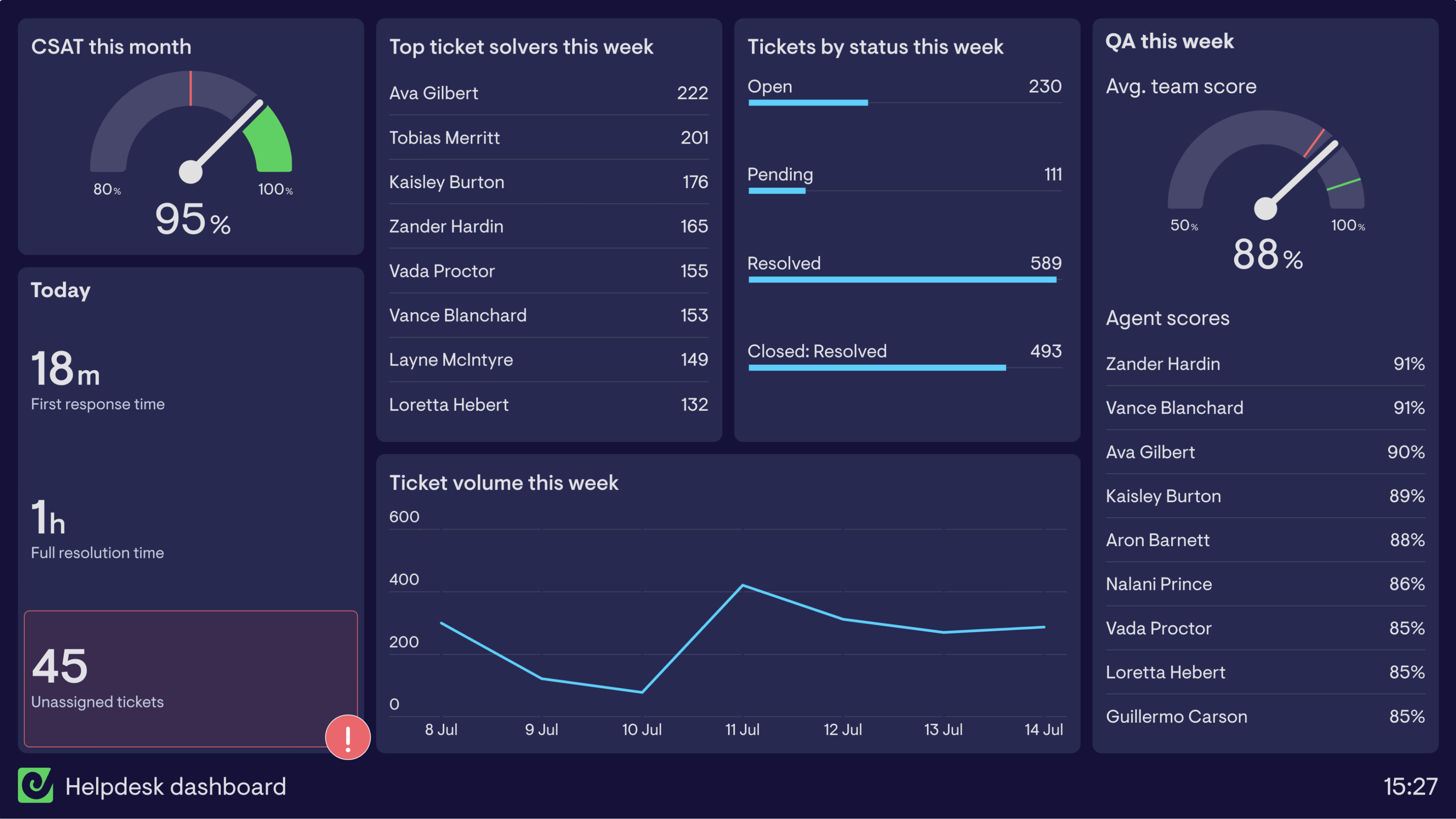
Try freeZendesk dashboards visualize useful data and KPIs from Zendesk, enabling team leads, agents, and the wider organization to understand what’s going on in support. Geckoboard’s Zendesk dashboards are easy to build, can be shared on desktop, mobile, and TV wallboards, and refresh automatically — Support metrics every 10 minutes, Chat every minute, and Talk every 30 seconds.

This dashboard brings together the ‘must know’ information that allows managers and agents to quickly understand if things are ticking over normally or if there’s a spike in tickets. It shows open tickets by priority and type, open tickets by assignee and unassigned tickets (with a red alert when unassigned tickets exceed 5), tickets today and tickets requiring attention, and key efficiency metrics — first response time, full resolution time, requester wait time, and one-touch-ticket rate.

This dashboard surfaces a mixture of live and longer-term data, giving the team a single view of the most important metrics. It shows tickets for the week, new and solved tickets today versus the same day last week, current open and pending tickets with status indicators, CSAT this week and year to date, and a list of the oldest open tickets — keeping everyone motivated to close tickets and helping managers step in when needed.

This dashboard gives a snapshot of how individual agents’ days are going — useful for hands-on managers and for sharing directly with agents. It shows open tickets per agent (turning red above 10), tickets solved over the past 7 and 30 days, ticket updates and one-touch ticket rate this week on a leaderboard, and oldest assigned tickets to make sure nothing is left lingering. Seeing performance relative to peers can spark friendly competition while helping agents who might be struggling get support earlier.

This dashboard helps a support team stay on top of their service level agreements and quickly identify areas needing attention. It tracks full time to resolution (FTTR) broken out by high, medium, and low priority tickets with a week-on-week comparison, SLA breach counts by policy and percentage of tickets meeting SLAs today, open tickets by type and priority, and a feed of tickets requiring attention based on age.

When it’s time to share numbers with others in the organization, a summary of the previous period’s performance is often more effective than a live dashboard. This dashboard summarizes the past week — designed to be posted automatically every Monday morning to the support team’s Slack channel and emailed to management. It covers ticket volume and top ticket solvers, SLAs achieved and CSAT, and efficiency metrics like first reply time, full resolution time, one-touch ticket rate, and average agent wait time.

Zendesk Messaging conversations create tickets when picked up by an agent, so it’s possible to monitor Messaging metrics using Geckoboard’s Zendesk Support integration — filtering by the ‘Channel is native messaging’ option. This dashboard tracks tickets created, full resolution time, active SLA tickets, and CSAT specifically for the Messaging channel throughout the day.
Build dashboards like these with Geckoboard
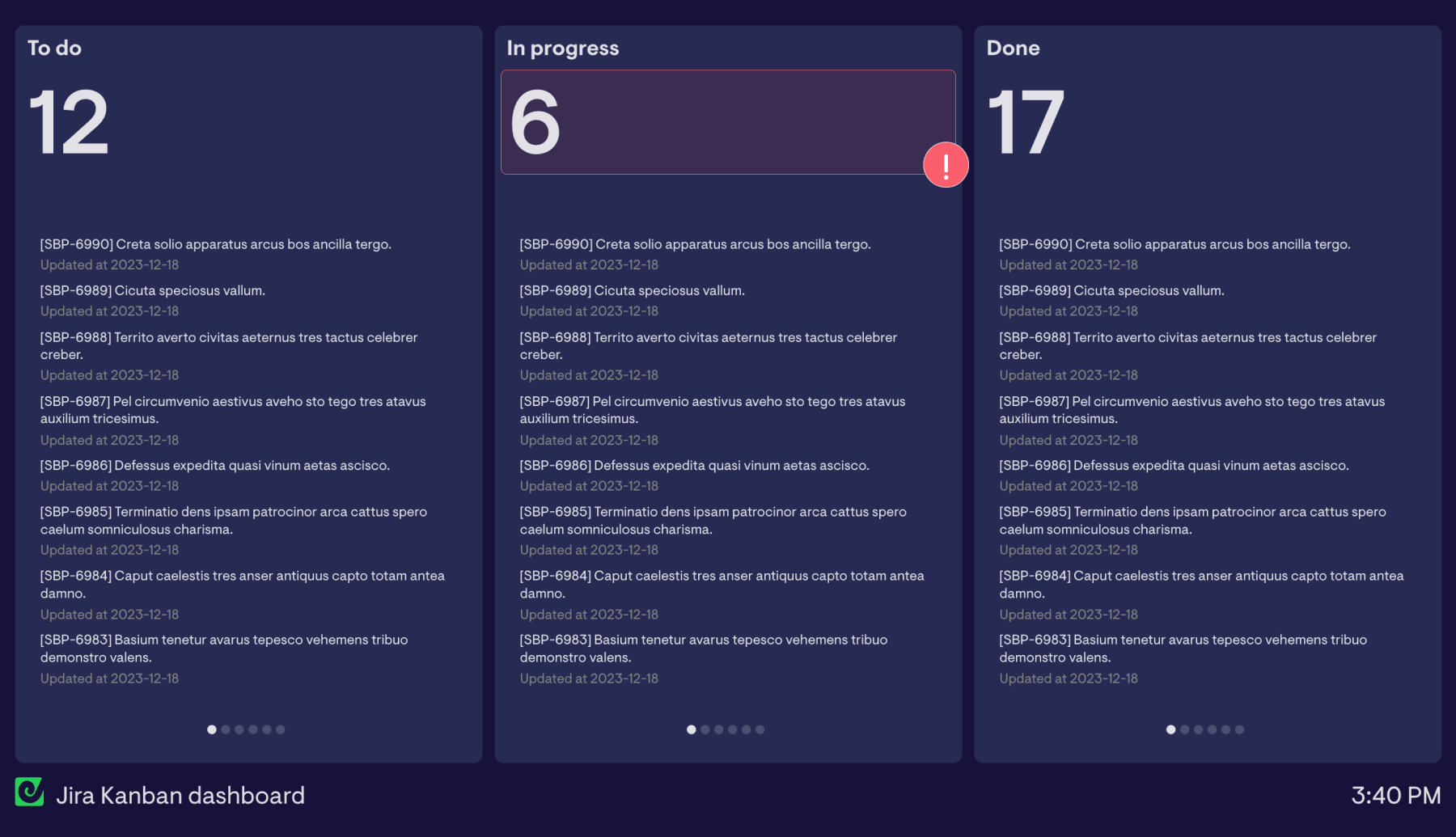
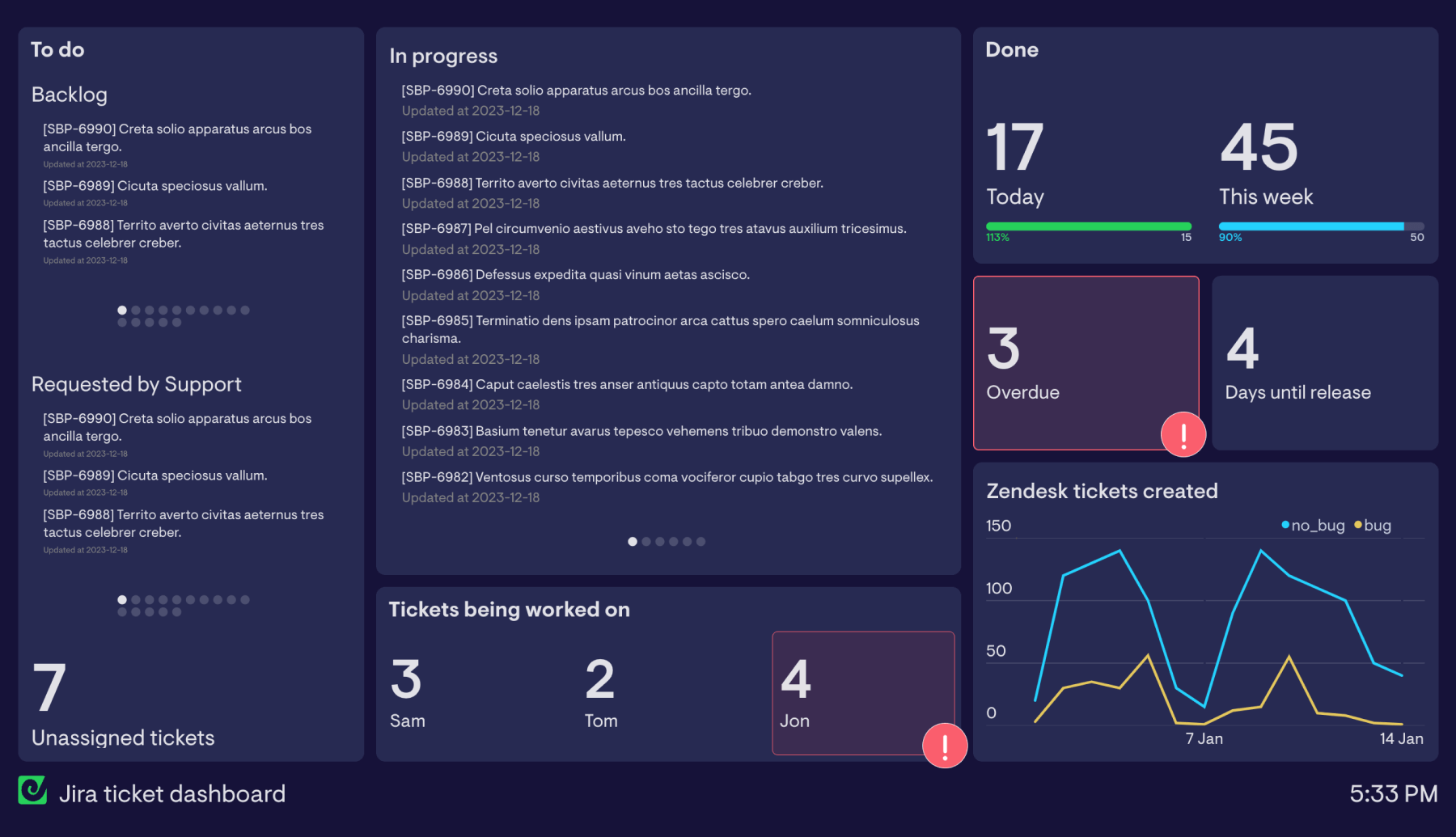
Try freeJira dashboards visualize useful data and ticket information from Atlassian’s Jira, enabling project managers and the wider organization to keep track of one or more workflows in real time. They help teams spot bottlenecks early, balance workloads, and raise the visibility of KPIs beyond what’s immediately visible inside Jira itself.

This dashboard is split into sections containing tasks at different stages of a Kanban workflow — to do, in progress, and done — with a running total of how many tasks are at each stage. Unlike a traditional Kanban board, it also shows totals per stage, which is particularly useful when a project has a fixed number of tasks to complete. When a task moves in Jira, the dashboard updates automatically so the team can track progress with it open in a browser, on mobile, or displayed on an office TV.

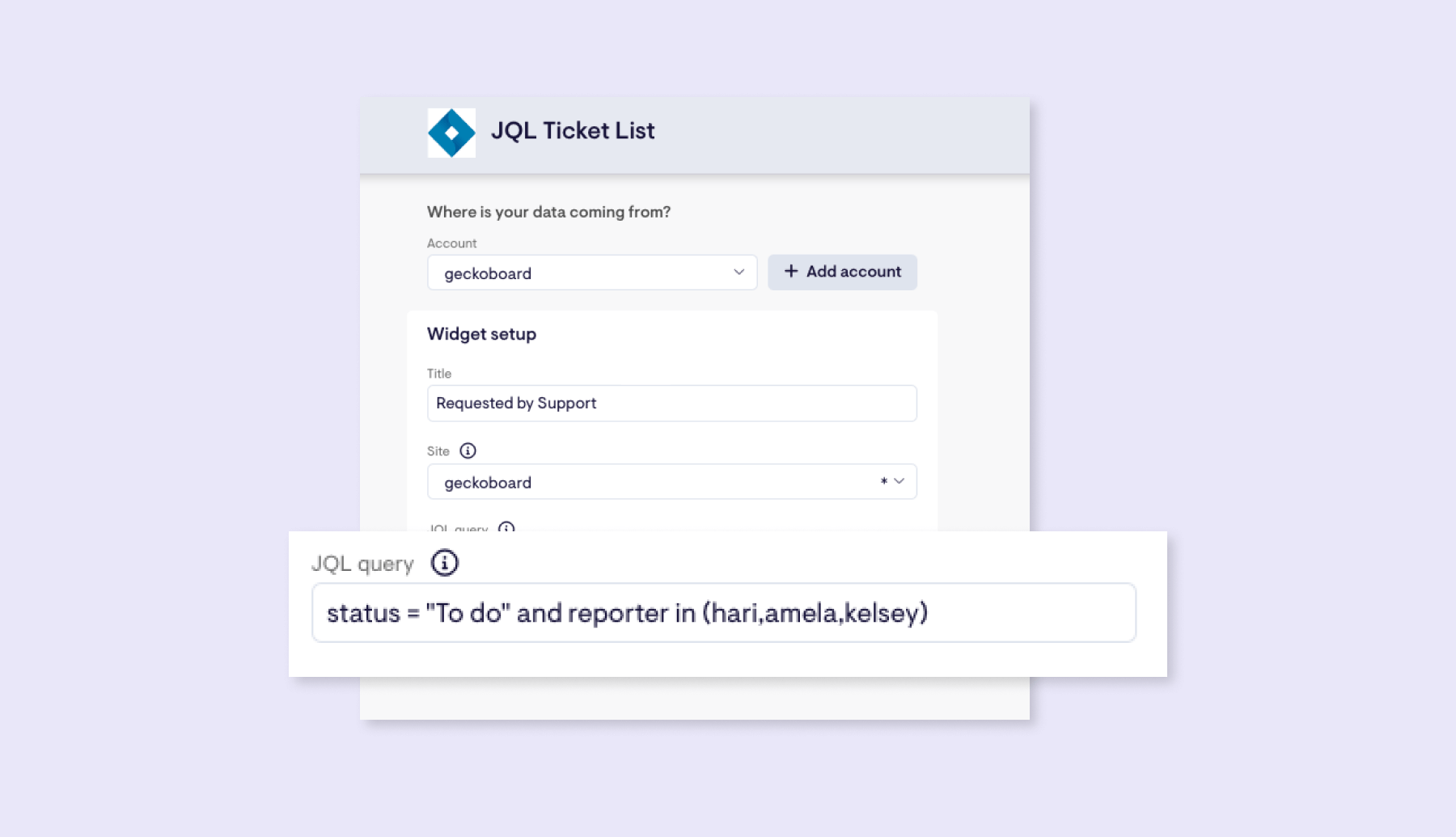
This dashboard combines Kanban board elements with metrics that give a top-down view of how the team is managing their workload. Tasks at the ‘To do’ stage are split by requester to differentiate backlog from support-requested tickets. Along the bottom, metrics show unassigned tickets, tickets picked up by each team member, and overdue tickets — with status indicators flagging when counts become a concern. Zendesk ticket volume is included alongside Jira data, giving the team an early heads-up on any support issues that may need their attention.
Build dashboards like these with Geckoboard
Try freeIntercom dashboards allow Customer Support teams to easily track individual performance towards their KPIs. Support Managers can motivate their team by giving agents ownership of their data and allowing them to see how they rank compared to their peers. These dashboards bring KPIs — usually hidden in Intercom reports — together in one place that can be displayed on a TV in a contact center or office.

This dashboard was created to motivate the team to meet two goals: keeping First Response Time (FRT) below 15 minutes and Time to Close under two and a half hours. Today’s average FRT sits alongside a leaderboard showing each agent’s FRT and the number of unassigned conversations. A line chart shows closed conversations for the week by agent. The main section breaks down KPIs per agent beneath a photo of each team member — including photos has been found to significantly boost engagement with the dashboard.

This dashboard is loosely based on Intercom’s team performance reporting, designed to give a quick indication of how the team is performing as a whole. First response time is a particular focus, with widgets showing today’s FRT alongside the trend for the week and a breakdown by channel. The middle of the dashboard shows conversations closed during the week by each teammate and average time to close. On the right, Google Analytics data is combined with Intercom metrics to show help center performance — an example of how Geckoboard can combine data from different sources.

This inbox performance dashboard gives managers and teammates a real-time view of how the team inbox is performing throughout the day — ideal for displaying on a large screen or TV. It shows new conversations broken out by tag, large widgets for time to close, first reply time, and first assignment to close time, plus details on the current flow of conversations including snoozed and unread counts and today’s average satisfaction score.
Build dashboards like these with Geckoboard
Try freeAircall dashboards visualize live call metrics, allowing managers to keep a real-time view of KPIs and make sure appropriate levels of service are being met. They’re also used to motivate sales and customer service teams on the phones. In a call center setting, dashboards on a TV are particularly useful as they make performance data available to everyone at a glance.

This dashboard gives the manager an overview of the call center while giving agents visibility of the queue and their individual performance. Calls Waiting and Active Calls are grouped at the top left, followed by key daily metrics — Average Talk Time, Wait Time, and Missed Calls. A leaderboard motivates agents to move through calls efficiently. For managers, the dashboard also shows calls received today, agent availability, and a detailed call list showing where calls are being missed.

This dashboard combines data from Aircall and Zendesk to give the whole team a real-time overview of daily performance. Calls Waiting and unassigned tickets are highlighted at the top — both should stay as low as possible. The top row then shows daily call metrics while the next row covers ticket metrics. Two leaderboards at the bottom track wait time between calls and tickets solved. A line chart shows call and ticket volumes through the week, and an agent availability table helps streamline shift handovers.

This real-time dashboard gives instant visibility into live call activity across both sales and support. It shows how many teammates are on calls, wrapping up, or available — plus queue pressure metrics like active calls, longest wait today, and callers waiting. Two separate call feeds show outbound sales calls and inbound support calls with current status, who’s handling each call, and live duration. Ideal for TV wallboards, shift handovers, or daily stand-ups, it helps teams rebalance workloads and maintain SLAs during busy periods.
Build dashboards like these with Geckoboard
Try freeHubSpot Service Hub dashboards give teams and managers real-time visibility into customer service performance. These dashboards help managers track KPIs like ticket volume, response times, SLA compliance, and customer satisfaction, while also motivating agents with clear, transparent performance data — whether used on individual screens or displayed on a TV in the workspace.

This dashboard is designed for support managers and agents to surface the live metrics needed to balance workloads and stay ahead of bottlenecks. It tracks ticket volume as it fluctuates throughout the day, shows which channels are driving demand, and monitors new and open tickets by status. It also highlights SLA breaches, tracks time to first response, and shows each agent’s current workload so tickets can be reassigned before queues build up.

This dashboard gives managers and agents a live view of individual performance. It surfaces first reply time and first resolution time per agent, tickets solved today and this week, tickets waiting by type, unsolved tickets per agent, full resolution time by team and priority, and team average response time today. Because the data refreshes automatically, agents can see how they’re doing in the moment — creating a transparent environment that encourages quicker responses and helps managers spot coaching opportunities early.
Build dashboards like these with Geckoboard
Try freeConnect Zendesk, Intercom, Aircall, and your other data sources to create a live support dashboard in minutes.
Start free trial